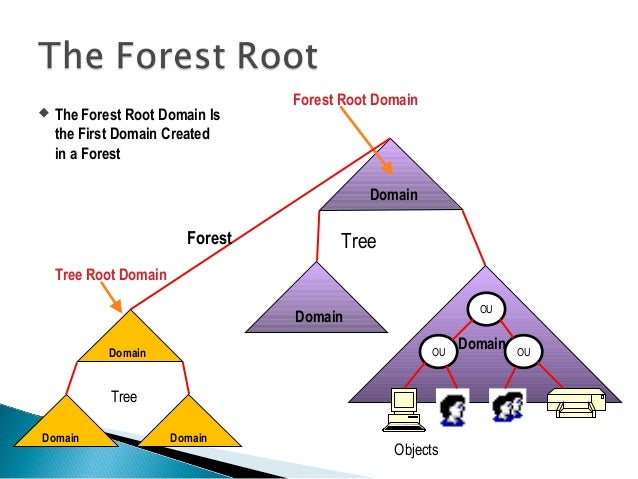
This blog will give the solution and fix for Active Directory and Messaging administrators

  • A directory is a hierarchical structure that stores information about objects on the network. Active Directory Domain Services (AD DS), stores information about objects on the network like user accounts, such as names, passwords, phone numbers, and so on, and enables other authorized users on the same network to access this information. Active Directory uses a structured data store as the basis for a logical, hierarchical organization of directory information.

  • Microsoft 365 is a cloud-based services designed to help meet your organization's needs for robust security, reliability, and user productivity.

  • Microsoft Learning

    Learn technical skills with Microsoft role based certifications, find the right training and certification opportunities to aid in your career growth and success.

  • Microsoft Exchange Online is a hosted messaging solution that delivers the capabilities of Microsoft Exchange Server as a cloud-based service. It gives users access to email, calendar, contacts, and tasks from PCs, the web, and mobile devices. It integrates fully with Active Directory, enabling administrators to use group policies, as well as other administration tools, to manage Exchange Online features across their environment

  • Powershell

    A comprehensive command line interface and scripting language for Windows. Introduced in 2006, PowerShell is a major upgrade from the Windows command line, which uses DOS commands. PowerShell supports common programming structures such as "if-then-else" and "while," it is generally less complicated than Microsoft's VBScript and JScript languages.

Showing posts with label Active Directory. Show all posts

Error NT AUTHORITY\ENTERPRISE DOMAIN CONTROLLERS doesn't have Replicating Directory Changes


I was working for Domain controller upgrade from 2008 R2 to 2012 R2 after introducing the new 2012 ADC DCDIAG shows the below error messages and the error may happens active Directory domains not prepared Active Directory for read only domain controllers with "adprep /rodcprep" but my case DC build went without any error and haven't executed the command. 
After referring some articles, this is related AD replication permission and domain controller don't have permission to do the "replication directory changes" because of AD preparation issue.......

We have to manually give the permission to fix the errors.

DCDIAG output:
1. Error NT AUTHORITY\ENTERPRISE DOMAIN CONTROLLERS doesn't have Replicating Directory Changes In Filtered Set
Starting test: MachineAccount
         ......................... DC1 passed test MachineAccount
      Starting test: NCSecDesc
         Error NT AUTHORITY\ENTERPRISE DOMAIN CONTROLLERS doesn't have
            Replicating Directory Changes In Filtered Set
         access rights for the naming context:
         DC=ForestDnsZones,DC=test,DC=local
         Error NT AUTHORITY\ENTERPRISE DOMAIN CONTROLLERS doesn't have
            Replicating Directory Changes In Filtered Set
         access rights for the naming context:
         DC=DomainDnsZones,DC=test,DC=local
         ......................... DC1 failed test NCSecDesc
      Starting test: NetLogons
         ......................... DC1 passed test NetLogons

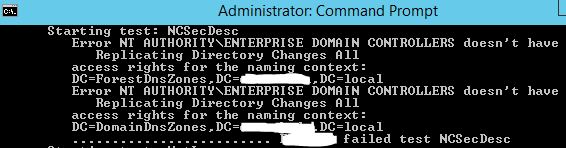
2. Error NT AUTHORITY\ENTERPRISE DOMAIN CONTROLLERS doesn't have Replicating Directory Changes All
......................... DC1 passed test MachineAccount
Starting test: NCSecDesc
   Error NT AUTHORITY\ENTERPRISE DOMAIN CONTROLLERS doesn't have
      Replicating Directory Changes All
   access rights for the naming context:
   DC=ForestDnsZones,DC=test,DC=local
   Error NT AUTHORITY\ENTERPRISE DOMAIN CONTROLLERS doesn't have
      Replicating Directory Changes All
   access rights for the naming context:
   DC=DomainDnsZones,DC=test,DC=local
   ......................... DC1 failed test NCSecDesc
Starting test: NetLogons
Solution: 
  1. Go to ADSIEDIT.msc and Connect the connecting point: DC=ForestDnsZoones,DC=xxxxx,DC=xxxxx
  2. On DC=ForestDnsZoones,DC=xxxxx,DC=xxxxx right click and select Properties.
  3. On the Window select Security tab then select Advanced button
  4. Select Enterprise Domain Controllers --> Replicating Directory Changes and click on Edit
  5. Then select check box "Allow checkbox to Replicating Directory Changes In Filter Set" and Apply to "This object and all descendant objects"
  6. And, also select "Apply these permissions to objects and/or containers within this container only"
Repeat the above steps for DC=DomainDnsZones,DC=xxxxx,DC=xxxxx and do the same actions.


Follow the below in Windows 2012 or later OS versions:


I hope this may helps....!
Share:

Repadmin Active directory replication monitoring tool step by step


Microsoft provides Active Directory Replication Status tool GUI mode to view the AD domain controllers replication and Repadmin.exe is a very old and command line tool it helps administrators to monitor Active directory replication problems between domain controllers and it helps to fix the AD replication issues.

This tool (repadmin.exe) is a available on Windows Server 2008 and Windows Server 2008 R2. It is available if you have the AD DS or the AD LDS server role installed. It is also available RSAT (Remote Server Administration Tools). We can also use Repadmin.exe to monitor the Active Directory Domain Services (AD DS) forest health.

You need Domain Admins rights to use the tool, also you can delegate the specific permissions to view and manage AD replication status.

REPADMIN COMMANDS:

REPADMIN /KCC command helps to check Knowledge Consistency Checker (KCC) on targeted domain controllers to immediately recalculate the inbound replication topology.

By default, each domain controller performs this recalculation every 15 minutes. Run this command to troubleshoot KCC errors after you remove suspected fault conditions or to re-evaluate whether new connection objects must be created on behalf of the targeted domain controllers. commands

Repadmin /kcc
Repadmin /kcc <servername>
Repadmin /kcc site:Default-site

Repadmin /kcc <servername> /async Specifies that replication is asynchronous. Repadmin starts the replication event, but it takes sometime get response from the destination domain controller, /async parameter help to start the KCC immediately, if you do not want to wait for the KCC to finish.

But, we can use Repadmin /kcc without the /async parameter.

Share:

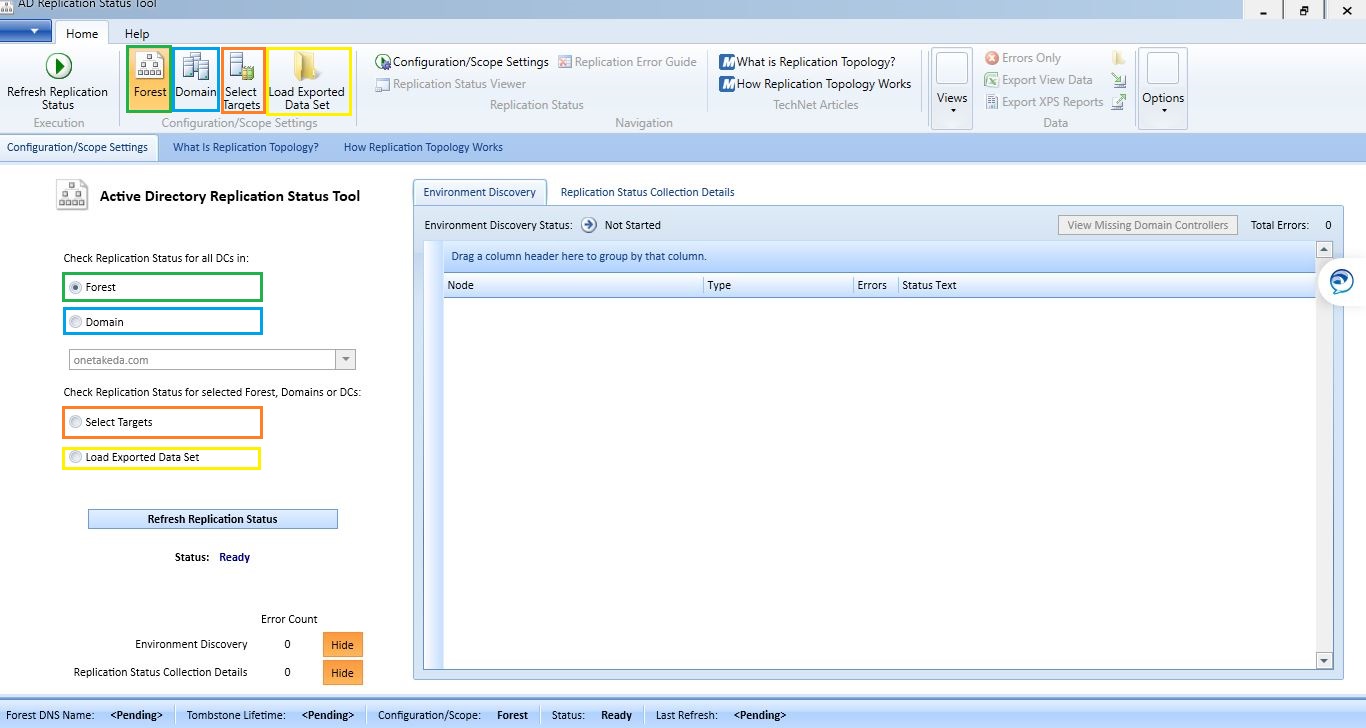
Active Directory Replication Status Tool Step by Step

Active directory replication is important for active directory infrastructure. We have command line tool "REPADMIN" and this will help us to check the AD replication status and offers lot many like sync AD partitions, identify / remove lingering objects, showmeta and etc....,

In this article, we are going to see Active Directory Replication Status Tool, this is a small but very handy GUI tool was published by Microsoft.
This tool help us to analyze the replication status of entire active directory environment. 

Benefits:
  • Automatically discover all domain controllers in your environment
  • Expose Active Directory replication errors occurring in a domain or forest
  • Prioritize errors that need to be resolved in order to avoid the creation of lingering objects in Active Directory forests
  • We can get the output in GUI which we get from the command REPADMIN /SHOWREPL * /CSV.
  • Find Replication Errors in GUI and will give a quick report about Ad replication errors.
  • We can run this tool for a domain or entire forest,
  • Help administrators and support professionals resolve replication errors by linking to Active Directory replication troubleshooting content on Microsoft TechNet
  • Allow replication data to be exported to source or destination domain administrators or support professionals for offline analysis

Limitation:
  • Active Directory Replication Status Tool only give the replication status of our AD environment. It will not give all the option which we have in REPADMIN. like.. replicate AD partition/sync. 

AD Replication Status Tool prerequisites:
  • .NET Framework 4.0.  
  • Access to all domain controllers from the machine you run the AD Replication Status Tool.  
  • A domain user account which can be member in any of the domains in the forest.  
  • AD Replication Status Tool installed machine must be joined to a domain in the forest.
  • Cannot be run from Server Core. 


Share:

Active Directory Ports for client communication

1.2 active directory
Active directory required port communication between forest to forest | domain to domain | clients to domain controllers. Below are the port details which we have to allow for successful communication.

In general, firewall separates the domain controllers communication, ports to be allowed in firewall.

All below listed ports are not required in all scenarios. For example, if the firewall separates members and DCs, you don't have to open the FRS or DFSR ports. Also, if you know that no clients use LDAP with SSL/TLS, you don't have to open ports 636 and 3269.

UDP Port 88 for Kerberos authentication
UDP and TCP Port 135 for domain controllers-to-domain controller and client to domain controller operations.
TCP Port 139 and UDP 138 for File Replication Service between domain controllers.
UDP Port 389 for LDAP to handle normal queries from client computers to the domain controllers.
TCP and UDP Port 445 for File Replication Service
TCP and UDP Port 464 for Kerberos Password Change
TCP Port 3268 and 3269 for Global Catalog from client to domain controller.
TCP and UDP Port 53 for DNS from client to domain controller and domain controller to domain controller.
udp 123 for time service
udp for netlogon and netbios
TCP 139
Client Port(s)
Server Port
Service
49152 -65535/UDP
123/UDP
W32Time
49152 -65535/TCP
135/TCP
RPC Endpoint Mapper
49152 -65535/TCP
464/TCP/UDP
Kerberos password change
49152 -65535/TCP
49152-65535/TCP
RPC for LSA, SAM, Netlogon (*)
49152 -65535/TCP/UDP
389/TCP/UDP
LDAP
49152 -65535/TCP
636/TCP
LDAP SSL
49152 -65535/TCP
3268/TCP
LDAP GC
49152 -65535/TCP
3269/TCP
LDAP GC SSL
53, 49152 -65535/TCP/UDP
53/TCP/UDP
DNS
49152 -65535/TCP
49152 -65535/TCP
FRS RPC (*)
49152 -65535/TCP/UDP
88/TCP/UDP
Kerberos
49152 -65535/TCP/UDP
445/TCP
SMB (**)
49152 -65535/TCP
49152-65535/TCP
DFSR RPC (*)

Protocol

TCP
UDP
ICMP
RDP
Remote Desktop
3389


DNS
DNS Download
53


DNS Queries

53

WINS Replication
WINS
42


WINS

42

ICMP
echo-request


8

info-request


15

mast request


17

timestamp


13
NetBIOS Services
Name Resolution Service 
137
137


Datagram  Services (Browsing)

138


Session Service (net use)
139


SMB
Input
445


Output

445

Remote Storm

1025


NTP
NTP
123


NTP

123

Content Replication
Content_Repl
507


Kerberos
Kerberos-Secure

750


Kerberos_v5
88 + 464


Kerberos_v5

88 + 464

LDAP
LDAP
389


LDAP

389


LDAP over SSL/TLS
636
636


Global Catalog
3268


Global Catalog over SSL/TSL
3269


Replication
Active Directory
RPCSS Dynamic


FRS
RPCSS Dynamic


Microsoft CIFS
Microsoft-CIFS (DS) 
445


Microsoft-CIFS (DS)

445

RPC – Cert Services (+)
RPC
135


SNMP
SNMP Agent

161


SNMP Trap
162


ASP.Net State Service

42424


Link State Algorithm Routing

691


TCP – High Ports  (Cert Services)
> 1023
1024 - 65535


Reference: https://support.microsoft.com/en-us/help/179442/how-to-configure-a-firewall-for-domains-and-trusts
Share:

Search This Blog

Categories

Recent Posts